Features
Empower your testing process with ReportPortal
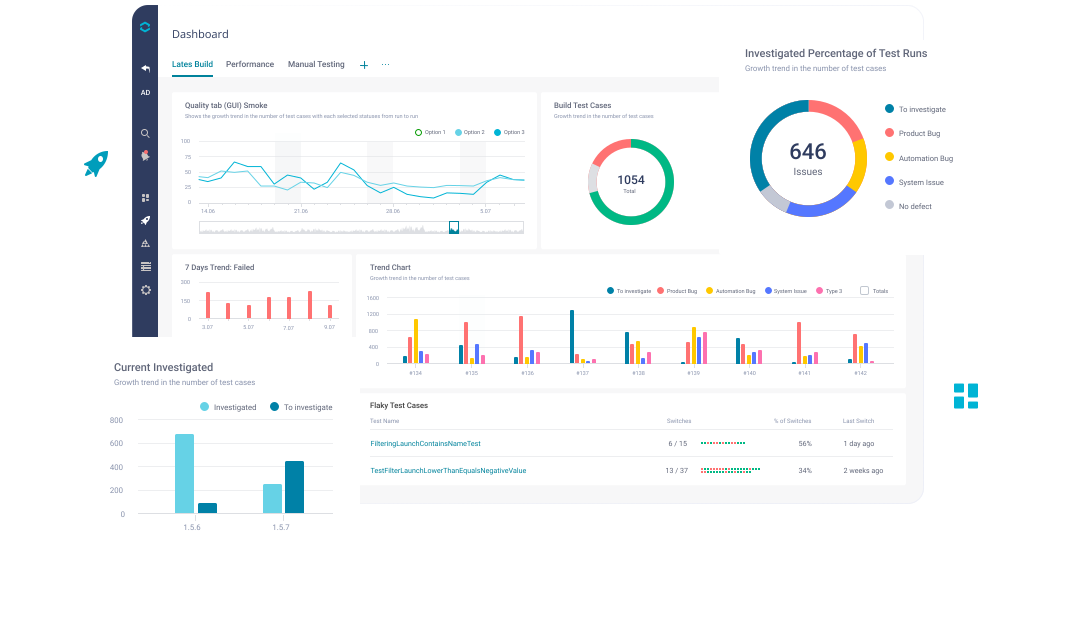
Explore ReportPortal features
Single-entry point and unified test reporting
Use a single-entry point to aggregate the results of all the automated tests in a unified way. It will help you to improve the efficiency and consistency of the testing process, enhance traceability and collaboration between the development team and stakeholders as all test results can be accessed, reviewed, and analyzed in one place.
Learn more about Single-entry point and unified test reporting
Categorisation of failures based on issue roots
Get a better understanding of the underlying causes of the failures and set the appropriate Defect types to them: Product bug, Auto Bug, System Issue or custom type. Having all the failures categorized, you will be able to understand the failures context better, prioritize the issues and ensure that the most critical issues are addressed first.
Learn more about Categorisation of failures based on issue roots
AI-based failure reason detection
Reduce the time and resources by automating the process of identifying the root cause of test failures. By automating failure triaging process, your team will be able to focus on addressing the identified issues, increasing the coverage, rather than spending time on manual analysis.
Learn more about AI-based failure reason detection
Rich artifacts in test reports
Get additional information beyond the basic test results, such as logs, screenshots, video recordings and network traffic (payloads and requests). This information will help you to speed up results analysis and categorization by providing more details about the test results and will make it easier to replicate and debug issues.
Learn more about Rich artifacts in test reports
Real-time reporting
Access and view test results as soon as they are generated. No need to wait for the moment when test execution is completed. It will help you to speed up the process of addressing issues and save a significant amount of time in the long run.
Learn more about Real-time reporting
Visualisation of test results
Get a better understanding of the overall status of the testing process and product health, identify areas that need improvement and make data-driven decisions on product release.
Learn more about Visualisation of test results
REST API
Access and manipulate test results in a programmatic way in order to automate the process of sending test results, integrate with other tools, create custom reports, generate alerts or notifications and trigger certain actions like re-running of test cases, or triggering a build in a CI/CD pipeline.
Learn more about REST API
Quality Gates
Use as an objective means of evaluating the quality of a software release, as opposed to subjective opinions or guesses. This will help to ensure that the software is of high quality and is free of major defects or issues, which can improve customer satisfaction and reduce the risk of software failures.
Learn more about Quality Gates
Integrate with your existing test automation process
Integrate ReportPortal with frameworks, bug tracking systems, infrastructure providers you already use and others so as to streamline the development and testing processes
Supported frameworks
Explore supported frameworks by language
















Start testing with ReportPortal
Ready to get the most of ReportPortal features? Start your 30-day free trial or get in touch with us to learn more about our offer.

Frequently asked questions

Premium feature is an advanced feature which comes on top of Free Open Source edition. It comes at no cost with SaaS offering and included into the "160" Managed Services package.
See the List of features and their description.